
Campaign Performance Dashboard
Analyzed 8,000+ campaigns from 2022 across multiple marketing channels. Built a multi-page Power BI dashboard that reveals ROI drivers, conversion performance, and cost inefficiencies through dynamic filters, KPIs, and interactive insights.
Audience: Growth/brand marketers, channel owners, and leadership.
Data scope: ~8K campaigns across 2022 with spend, impressions, clicks, conversions, ROI, channel, audience, duration, goal, and time.
Business questions
Are we generating returns for the money we spend?
Which goals / channels / audiences outperform?
Where are we wasting budget (burner campaigns), and how do we fix it?
I started by mapping the questions executives actually ask—“What’s our ROI?”, “Which channels are worth it?”, and “Where are we burning cash?”.
From there, I built a data model that supports flexible slicing (by goal, audience, and time) and DAX measures that turn numbers into stories—like Weighted ROI, MoM trends, and Burner detection.
The dashboard was organized to move from overview → diagnosis → action, ensuring every visual answers a decision question.
The dashboard contains five connected pages:
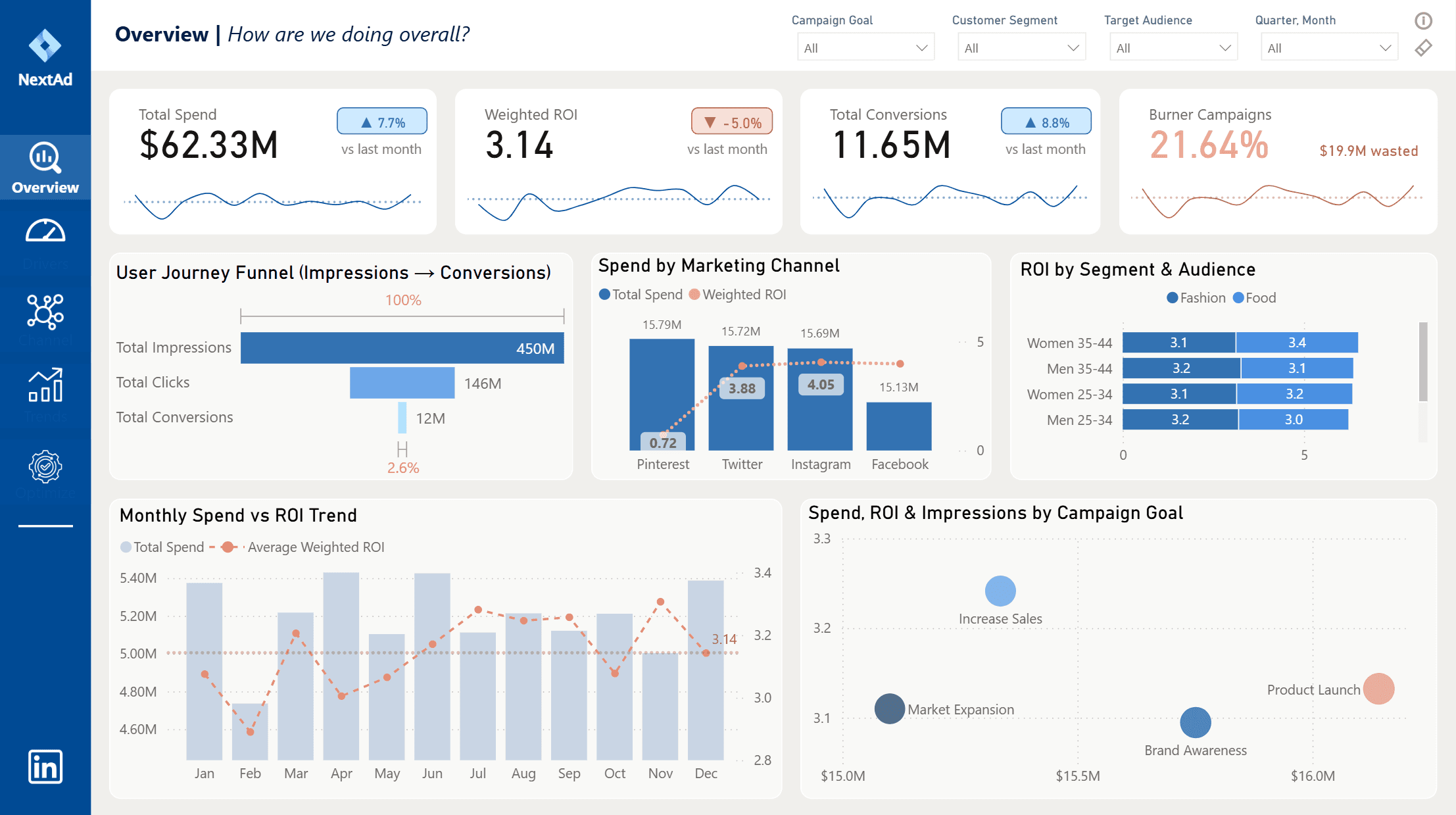
Overview: High-level KPIs (Spend, ROI, Conversions, Burners) with MoM % changes, sparklines, and wasted spend call-outs.
Drivers: Metric selector with CTR, CVR, CPA, CPC, and ROI to reveal top-performing audiences and goals.
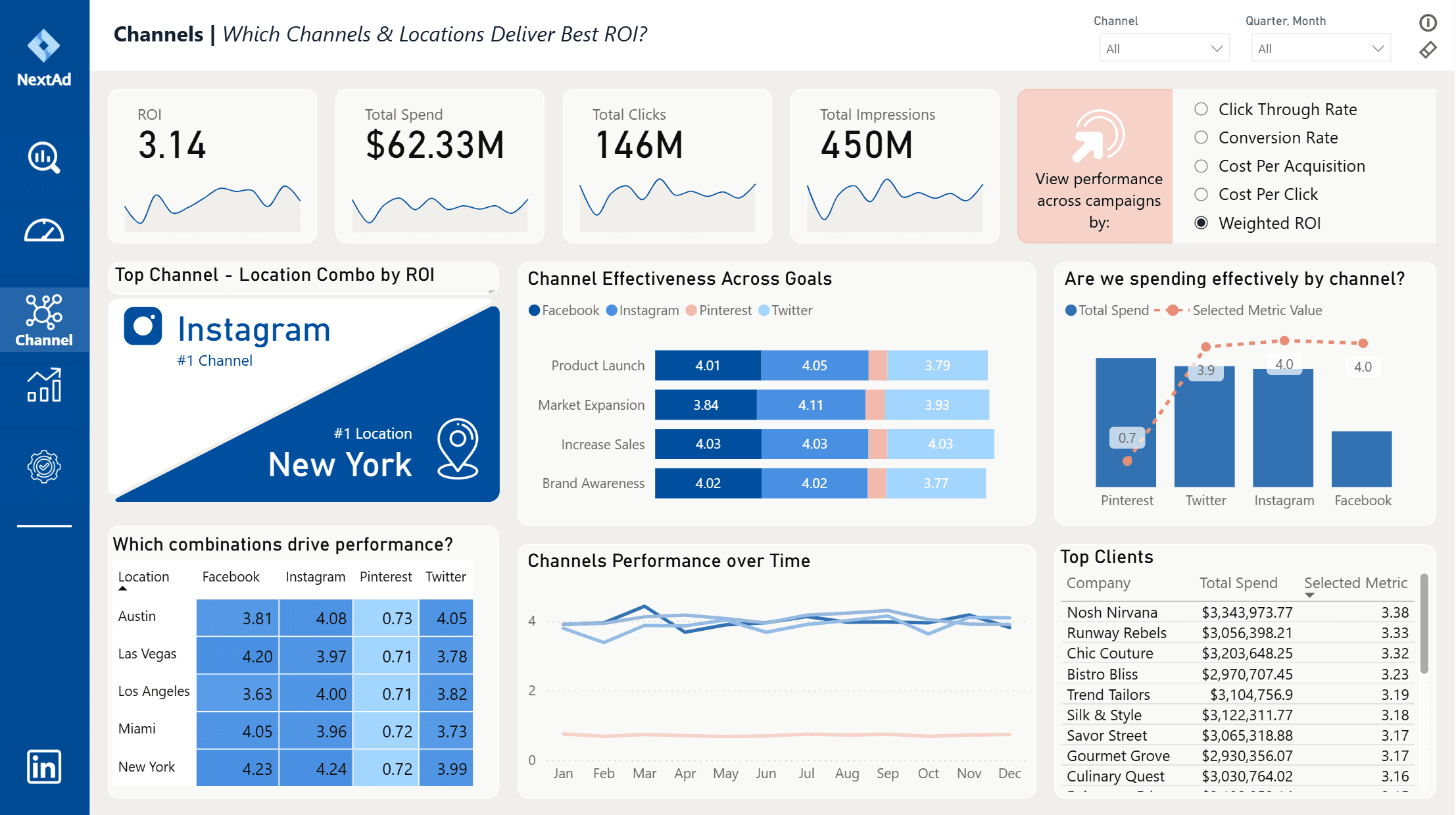
Channels: Channel × Location performance with efficiency comparison.
Trends: Month and weekday patterns for spend, ROI, and conversions.
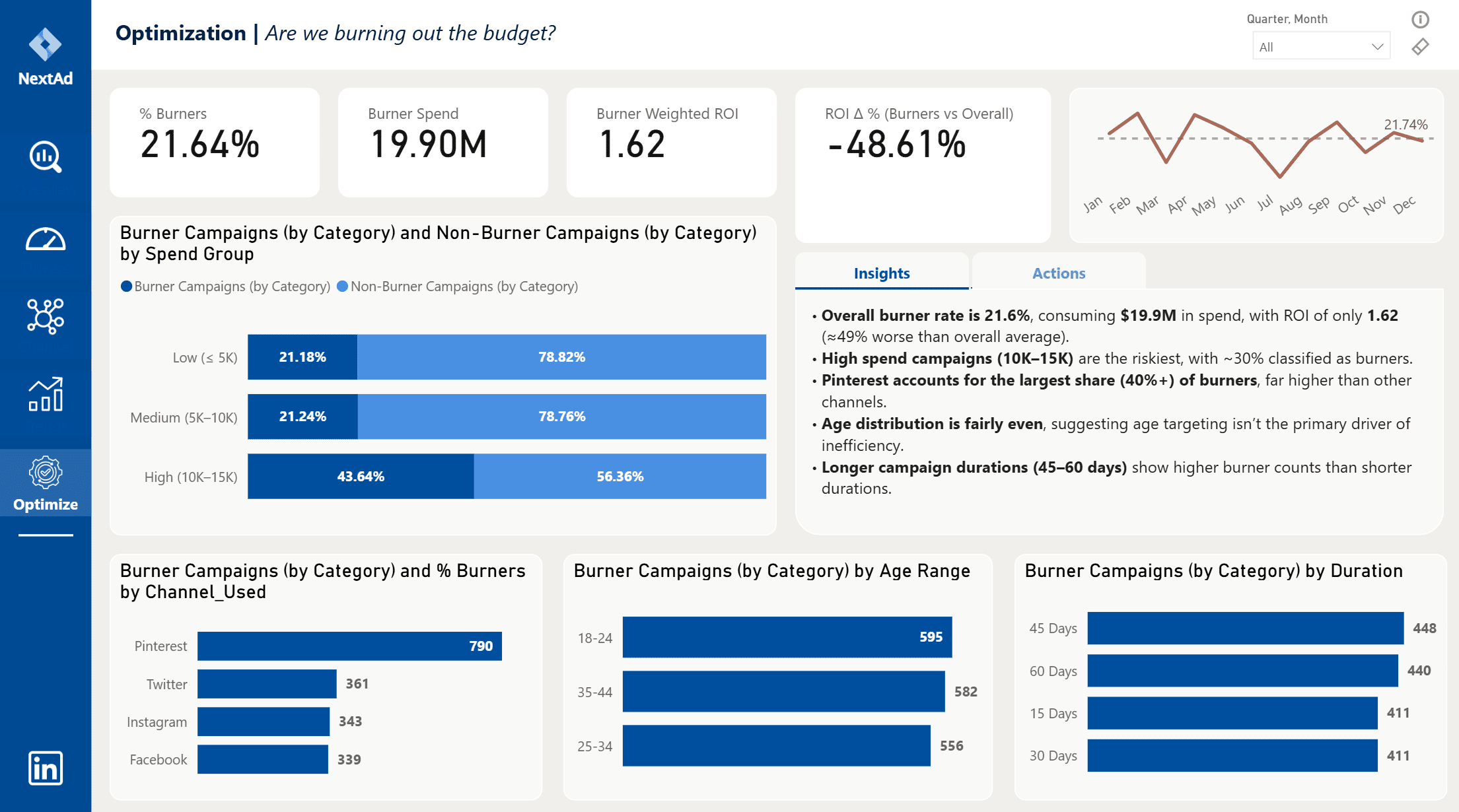
Optimization: Burner analysis with Insights / Actions tabs and prioritized recommendations.
Tracks total spend ($62.3M), weighted ROI (3.14), conversions (11.65M), and burner rate (21.6%) with MoM % change and sparkline trends.
Summarizes campaign funnel (Impressions → Clicks → Conversions) and highlights efficiency by channel and goal.
“Channel & Audience Drivers”
Compares ROI, CTR, CVR, CPA, and CPC across marketing channels, customer segments, and campaign goals.
Reveals which audiences and platforms deliver the strongest performance and where optimization potential lies.
“Burner Campaign Optimization”
Identifies underperforming campaigns based on ROI and CPA thresholds, quantifies wasted spend (~$19.9M), and presents dynamic Insights / Actions tabs that translate analytics into clear business decisions.
$62.3M total spend with ROI = 3.14 and CVR ≈ 8%.
21.6% of campaigns were “burners”, wasting ~$19.9M.
Pinterest had the highest share of burners; Instagram delivered the best ROI.
Shorter 15–30-day campaigns and medium spend levels were the most efficient.
Data cleaning & transformation: Structured and cleansed 8K+ campaign records using Power Query; standardized columns, data types, and date hierarchies.
Data modeling: Built a star schema linking campaign facts to dimension tables (date, audience, channel, goal) for efficient relationship management.
Time intelligence: Implemented dynamic measures for MoM, QoQ, and YTD calculations, ensuring trends and deltas update automatically with filters.
Advanced DAX: Developed custom logic for Weighted ROI, percentile-based CPA thresholds, burner detection, and dynamic benchmark comparisons.
Performance optimization: Reduced report load times using summarization tables and optimized relationships.
Interactive storytelling: Used Bookmarks, buttons, and sync slicers to create Insights/Actions tabs and seamless report navigation.
Business impact: Enabled data-driven marketing decisions by surfacing ROI efficiency, wasted spend, and actionable next steps.
+61 421 718 726
thanhthao.chu05@gmail.com